Mastering 2024 with a High-Quality Weekly Planner
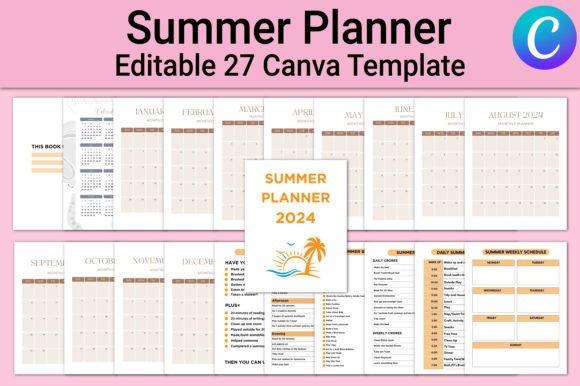
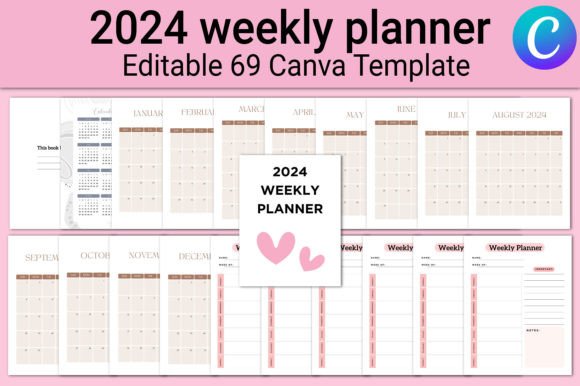
At its simplest, a 2024 weekly planner is a dated organizational tool spanning the entire year. But when you get a print-ready KDP interior that includes an editable Canva link—with 69 pages of monthly calendars, 52 weekly spreads, and notes—it transforms into something far more adaptable. This isn't just a static PDF; it's a complete design foundation you can tweak, brand, and produce as a physical book or a personal planning system. The files come in JPG, PNG, and PDF, sized at 8.5×11 inches, with no bleed, CMYK color, and 300 DPI, so they meet professional printing standards right away.
Why would someone care about this? Because planning isn't one-size-fits-all. A freelancer juggling client deadlines, a teacher mapping out semester lessons, a small business owner tracking inventory cycles, or a creative person building a self-care routine all approach time management from different angles. The same 2024 weekly planner interior can serve a hobbyist making a single spiral-bound agenda at home, a publisher launching a line of planners on Amazon, or an entrepreneur offering a branded scheduling tool to coaching clients. The key is understanding how its features align with your own goals, skill level, and project.
Who Values a Planner Like This—and Why
A commercial publisher evaluating this 2024 weekly planner will look for technical reliability: Are the files truly CMYK and 300 DPI? Is the bleed consistent? Does the Canva link preserve layer integrity so they can insert a logo or adjust fonts before exporting? For them, speed and commercial value top the list. A parent organizing household routines, on the other hand, might only care that the weekly view has enough writing space and that the notes pages allow for meal planning. They may never open the Canva file. A beginner dipping into digital design might see the editable link as a safe sandbox—low risk, no need to build layouts from scratch, just experiment with colors and see how print specifications work.
Understanding your own priorities helps you decide if this interior matches your needs. Some people want flexibility above all: the ability to delete pages, rearrange the order of months, or change the "Belongs to" page into something that reflects a brand. Others prioritize ease of use, hoping they can just hit print and have a functional tool within minutes. The 69 different pages included—from a full 2024 calendar to individual monthly spreads and 52 weeks—offer that choice. You can use the entire thing as-is, or treat the Canva template as a starting point for something more tailored.
When Simplicity Meets Creative Control
If you're a creator selling on Etsy or a coach who wants to send a branded planner to workshop attendees, the editable aspect changes the game. Instead of commissioning a designer, you open the Canva link, adjust a few colors to match your palette, maybe add an inspirational quote on the notes pages, and export a PDF that feels bespoke. This keeps costs low while still giving you a polished, commercial-grade result. For publishers, the fact that the files are ready for KDP with no bleed and correct CMYK settings removes the technical guesswork that often leads to rejected uploads. That reliability is worth just as much as the design itself.
Yet a hobbyist who simply loves tangible planning might never use the editable link and still get immense value. They can load the PDF onto an iPad for digital journaling, print pages at a local shop, or even bind a complete planner as a weekend craft project. The quality stays consistent because the 300 DPI resolution and 8.5×11 inch format ensure crisp lines whether you view it on a screen or touch the ink on paper. The inclusion of JPG and PNG files also means you can extract individual weeks to use as desktop wallpapers or insert them into a digital notebook app like GoodNotes.
Workflows That Reflect Real Life
Let's get practical. A freelance marketer might use the 2024 weekly planner to block out campaign launches and client meetings. They'll appreciate the 52 dedicated weekly spreads because each offers a bird’s-eye view of the next seven days without clutter. The monthly calendars act as a dashboard for bigger milestones. If this marketer also manages a remote team, they could duplicate pages in Canva, add team-specific sections, and create a shared vision for the quarter. The planner becomes a collaboration tool, not just a personal log.
For educators, the weekly view often needs to accommodate lesson planning blocks. They might open the Canva file, add extra lines in the notes area, and title it "Prep & Reflection." Because the interior has no set theme beyond clean functionality, it doesn't distract from the content. An art teacher can inject color without fighting against a pre-existing loud design. A tutor running a small business can insert a pricing table or terms on the notes pages before printing planners for students. The learning value here is high: you see how commercial print layouts are structured and gain confidence in modifying them.
A small business owner in retail might prioritize inventory check-ins and staff schedules. With the 2024 weekly planner, they could print only the months relevant to a seasonal rush, use the notes pages for vendor contacts, and keep everything in a binder that grows with the year. The no-bleed setup means they don't have to worry about trimming at home—standard printer paper works fine. That kind of low-friction utility matters when your brain is already full of operational details.
Quality and Presentation Through a Professional Lens
If you've ever uploaded a planner to KDP only to have the cover or interior rejected for formatting issues, you know why CMYK color and 300 DPI are non-negotiable. This 2024 weekly planner interior removes those hurdles. The 69 pages are pre-checked for consistency. The Canva link adds a layer of safety: you can preview how the calendar grid aligns, check font legibility, and ensure that the "Belongs to" page fits your design before final output. For someone publishing under their own brand, presentation is everything. A clean, high-resolution interior signals to a buyer that this is a quality product, reducing returns and building trust.
Even for a consumer who buys a finished planner printed from these files, the attention to detail matters. They may never notice the 300 DPI spec listed on a product page, but their eyes will recognize sharp text and smooth grids. They'll appreciate the ample writing room that a spacious 8.5×11 inch layout provides. Professionals using this for work will likely carry it into meetings, so a design that doesn't scream "hobby craft" but rather feels substantial and well-made boosts their own sense of preparedness.
Aligning the Planner with Your Skill Level and Intent
Beginners often feel overwhelmed by customizable templates. They worry about breaking the layout or getting lost in a design tool. If that’s you, start with the PDF. Print a few weekly pages and use them as loose sheets. Notice where you naturally want more space or a different category. Then, when you feel ready, open the Canva link and make only one small change—perhaps rename a notes section. This gradual approach builds confidence without pressure. The existence of both the static files and the editable link means you aren't forced into a workflow that feels unnatural.
Experienced designers and power users might immediately remix the interior. They might pull the weekly spread into another design tool, add linking tabs for a digital planner, or create a two-page-per-week layout by duplicating and mirroring. The value here lies in the structure being sound; you spend zero time troubleshooting page numbers or calendar dates. Instead, you focus on creative extension. That long-term usefulness—being able to repurpose the core for multiple years or entirely different products—adds a commercial edge for anyone building a stationery line.
Is This the Right 2024 Weekly Planner for You?
Ask yourself what you're really trying to solve. If you need a no-fuss, grab-and-go planner that you can print tonight, the included PDF with monthly and weekly layouts will serve you well. If you're a publisher or entrepreneur looking to create a unique product without hiring a layout artist, the editable Canva interior and print-ready specs save time and money. If you teach workshops or coach clients, you can personalize the planner to reinforce your methodology, making it a valuable handout that extends your teaching beyond the session.
This one interior bridges casual home use and commercial ambition. The file collection—from the "Belongs to" page to December 2024—respects that your time is precious. You don't have to reinvent the calendar wheel; you just have to decide how much you want to make it your own. The combination of JPG, PNG, and PDF ensures compatibility with nearly any workflow, whether you're printing at home, uploading to a print-on-demand service, or using a tablet stylus to plan digitally.
Making Every Week Count in 2024
The 52 weekly spreads aren't just date boxes. They're an invitation to structure your days with intention. One user might track health habits in the margins; another might log client hours; a student might block exam prep. Because the notes pages are separate and generous, you can fill them with project ideas, gratitude lists, meeting notes, or quarterly review prompts. There is no prescribed method—just the framework. That open-ended design respects the different ways adults approach their time.
When you evaluate a product like this, think about the long haul. A planner interior that's easy to modify, print-ready, and built to professional standards can support you through an entire year and beyond. The 2024 weekly planner described here doesn't lock you into a single approach. It hands you a solid foundation and then steps back, letting your own priorities—be they creativity, reliability, speed, or commercial scalability—guide the final result. That kind of flexibility is what turns a simple calendar into something genuinely useful.