Why a Subscription Tracker Printable Template Can Simplify Your Financial Life
Recurring subscriptions have quietly woven themselves into nearly every corner of modern life. Streaming platforms, cloud storage, fitness apps, meal kits, software licenses, beauty boxes — the list grows longer each month. Many people sign up for a free trial, forget about it, and only notice the charge when reviewing a bank statement weeks later. A Subscription Tracker Printable Template offers a straightforward, paper-based method to regain visibility and control over these recurring expenses without relying on yet another app or digital notification system.
Understanding the Purpose Behind a Subscription Tracker
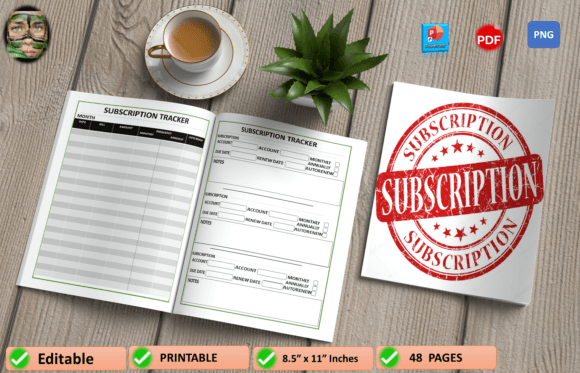
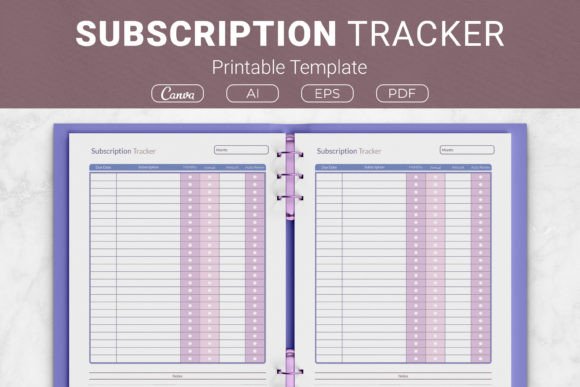
At its core, a Subscription Tracker Printable Template serves one clear function: it brings all recurring payment obligations into a single, reviewable document. Instead of logging into multiple accounts or scrolling through email receipts, you can glance at one page and immediately see what is due, when it is due, and how much it costs. The template typically organizes information in a table format with dedicated columns for the due date, subscription name, billing frequency — whether annual or monthly — the exact monthly amount, whether auto-renewal is enabled, and a notes section for any additional details.
This structure transforms scattered information into a coherent overview. For someone juggling five, ten, or even fifteen subscriptions across personal and professional domains, that overview becomes a practical decision-making tool. The act of writing things down also reinforces memory and awareness in a way that passive app notifications often fail to achieve.
What Makes a Well-Designed Subscription Tracker Printable Template Effective
Not all trackers are created equal, and the design elements included in a template can significantly affect how useful it becomes over time. A thoughtfully constructed Subscription Tracker Printable Template balances simplicity with sufficient detail. The column-based layout should feel intuitive rather than cramped. Here are some of the key features that contribute to a high-quality tracking experience:
- Due Date Column: Placing the due date front and center allows for chronological sorting, making it easy to see which payments land in the first week of the month versus the last.
- Subscription Name: Clear identification prevents confusion when similar services exist under different billing names.
- Billing Frequency Indicator: Distinguishing between annual and monthly subscriptions helps with long-term budgeting, since annual charges can catch someone off guard if forgotten.
- Monthly Amount Field: Standardizing costs to a monthly figure, even for annual subscriptions divided by twelve, creates a consistent baseline for comparison.
- Auto-Renew Status: Knowing which services renew automatically lets you prioritize reviewing those before the renewal date hits.
- Notes Section: A flexible space for recording cancellation deadlines, login credentials, shared account details, or reasons for keeping or considering cancellation.
When these elements coexist on a single page, the template functions as both a record and a prompt for periodic review. Some versions also include a summary area at the bottom where you can total monthly and annual spending, which adds another layer of financial awareness.
Who Benefits Most from Using a Subscription Tracker Printable Template
The appeal of a physical tracker spans a surprisingly broad audience. While digital natives might initially resist the idea of a printed document, many discover that a tangible sheet posted near a workspace or tucked into a budget binder offers a persistent visual reminder that phone alerts cannot replicate.
Freelancers and small business owners often maintain subscriptions for invoicing software, design tools, cloud backup, domain registrations, and marketing platforms. Each of these represents a deductible business expense, and a Subscription Tracker Printable Template simplifies the process of gathering totals during tax preparation. Rather than hunting through twelve months of statements, the tracker provides a consolidated record.
Households managing shared expenses can use a single tracker to document streaming services, grocery delivery subscriptions, children's educational apps, and family cloud storage plans. When multiple people contribute to household costs, having a visible list reduces misunderstandings about who pays for what and when charges occur.
Individuals focused on debt reduction or aggressive saving often find that subscription audits reveal surprising patterns. A tracker makes it easier to identify services that overlap — two music streaming accounts, for example, or unused premium tiers that could be downgraded. The visual impact of seeing a total monthly outflow written in one place can motivate meaningful changes.
Practical Scenarios Where a Physical Tracker Outperforms Digital Alternatives
Consider someone preparing for an extended vacation or a period of reduced income. They need to temporarily pause or cancel non-essential services. Opening a Subscription Tracker Printable Template and marking each line with a simple action — keep, pause, cancel — provides a clear, stress-reducing roadmap. There is no need to remember which app holds which subscription or to reset forgotten passwords just to check a billing date.
Another scenario involves end-of-year reviews. Many subscription services raise prices in January. Having a completed tracker from the previous year allows for direct comparison. You can see exactly which services increased their rates and decide whether the new price still aligns with the value received.
Parents teaching teenagers about budgeting can use a blank template as an educational exercise. Filling it out together — listing streaming services, gaming subscriptions, and app purchases — turns an abstract concept into a concrete conversation about recurring costs and mindful spending.
Evaluating Format Options and Physical Characteristics
A Subscription Tracker Printable Template typically comes in multiple size options, which makes it adaptable to different organizational systems. US Letter size at 8.5 by 11 inches fits standard binders and home printers, making it the most common choice for North American users. The A4 variant at 210 by 297 millimeters serves those in regions where that paper standard prevails. For those who prefer compact planners or traveler's notebooks, smaller dimensions like 7.5 by 9.25 inches or 6 by 9 inches offer portability without sacrificing readability.
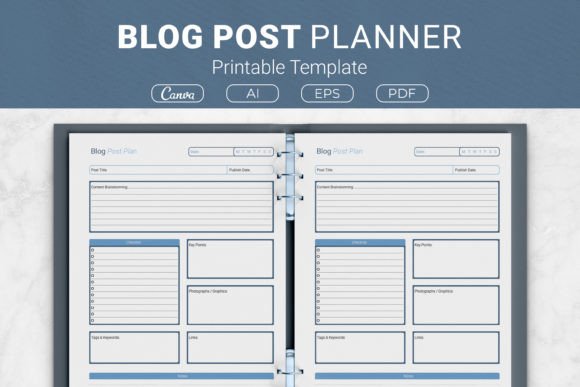
The file formats included in a comprehensive package also matter. AI Illustrator files provide editable source material for those who want to customize fonts, colors, or column arrangements. EPS files maintain compatibility across different design software. PDF files are ready to print immediately, requiring no additional setup. Some packages also include a link to Canva templates, which allows for online editing without installing specialized software. This variety ensures that both designers and everyday users can adapt the template to their preferences.
Strengths and Honest Considerations of a Printable Approach
Choosing a printed tracker over a digital subscription management app involves trade-offs worth acknowledging. The strengths are substantial. A physical sheet costs nothing to maintain beyond the initial printing. It requires no updates, no battery, no internet connection, and no learning curve. Privacy is inherent — subscription details remain on paper rather than residing in a third-party database. The tactile experience of crossing off a cancelled service or writing in a new one creates a sense of accomplishment that digital checkboxes rarely match.
However, a printable template also demands manual upkeep. You must remember to update it when adding or removing subscriptions. If the sheet gets lost or damaged, the record disappears unless you make copies. For someone with dozens of subscriptions that change frequently, the manual effort might feel burdensome compared to automated tracking tools. The key is matching the tool to the complexity of the situation. For most households and small operations managing between five and twenty recurring payments, a printable tracker strikes a workable balance.
Incorporating the Tracker into a Broader Organizational System
A Subscription Tracker Printable Template rarely exists in isolation. Many users integrate it into a larger personal finance binder alongside budget worksheets, debt payoff trackers, savings goal charts, and bill payment checklists. This integration transforms scattered financial documents into a cohesive command center. The subscription tracker becomes the section that handles recurring obligations, while other pages address variable spending, income tracking, and long-term planning.
For those involved in Kindle Direct Publishing or creating planner interiors, the template serves as a valuable content component. A KDP planner focused on budgeting or household management benefits from including a dedicated subscription tracking page. Customers purchasing such planners expect practical, actionable layouts, and a well-designed subscription tracker meets that expectation directly.
Making the Most of the Notes Column
The notes section often goes underutilized, yet it holds significant potential for those who treat it as a running log. Instead of leaving it blank, consider recording the date you signed up, the original promotional rate, and when that rate expires. Note any customer service interactions, confirmation numbers for cancellations, or the email address associated with the account. If you share a subscription with family members, list who has access. Over time, these small annotations create a valuable reference that prevents future headaches.
Seasonal Reviews and Subscription Audits
Establishing a rhythm for reviewing the tracker increases its effectiveness. Some people prefer a monthly check-in, aligning the review with bill-paying sessions. Others find that a quarterly audit works better, especially when many subscriptions operate on annual cycles. During each review, ask a few straightforward questions: Did I use this service in the past month? Does the cost still feel justified? Is there a lower tier that would meet my needs? Can I share this account with someone to split the cost?
A Subscription Tracker Printable Template makes these audits faster because the relevant information sits in one place. No searching, no logging in, no resetting passwords. Just a pen, a few minutes, and honest reflection.
Adapting the Template for Specific Needs
Because of the editable file options included in many template packages, customization extends beyond cosmetic changes. A freelance graphic designer might add columns for client-specific software subscriptions. A family might color-code entries by user — blue for parents, green for children. A small nonprofit could adapt the tracker to monitor donor management platforms, email marketing services, and website hosting fees. The underlying structure remains the same, but the specific columns and labels can shift to match the context.
Final Thoughts on Bringing Order to Recurring Expenses
Recurring subscriptions are unlikely to disappear from daily life. If anything, the subscription economy continues to expand into new categories — car features, clothing rentals, fitness equipment, and beyond. The challenge lies not in avoiding subscriptions altogether but in managing them with intention. A Subscription Tracker Printable Template offers a low-tech, high-clarity method for staying organized, avoiding late payments, and identifying opportunities to save money by cancelling or downgrading services that no longer earn their place in the monthly budget.
Whether printed at home and slipped into a binder, used as a KDP planner interior, or customized in design software for a specific audience, the template delivers one essential outcome: awareness. And awareness, when paired with consistent review, often leads to better decisions and more intentional spending.