Take Control of Your Recurring Payments with a Subscription Membership Tracker Printable
You sign up for a streaming service, a cloud storage plan, a productivity app, a monthly box of specialty coffee—and then months later, you notice the charges on your bank statement, half of which you’d forgotten about completely. This quiet drain on your finances happens more often than most of us like to admit. A Subscription Membership Tracker Printable is a simple, analog solution that sits at the crossroads of budgeting and life organization, giving you a clear snapshot of every active subscription so you can decide what to keep, what to pause, and what to cancel without second-guessing yourself.
Unlike a digital dashboard that sends you push notifications you might ignore, a physical tracker forces a moment of deliberate review. It fits seamlessly into a broader financial control process that includes monthly budget checks, annual expense audits, or even a minimalist lifestyle shift. When you track memberships on paper, you turn an abstract list of automatic payments into something you can touch, mark, and act on immediately.
Where a Subscription Tracker Fits into Your Financial Workflow
If you already maintain a household binder, a financial planner, or a bullet journal, the subscription tracker becomes one of its most practical inserts. It lives alongside your expense logs, savings goals, and bill pay checklists. In a broader planning process, it functions as both a snapshot and a decision-making tool. You might pull it out right before a monthly budget meeting with your partner, or when you’re preparing your taxes and need to categorize business-related subscriptions. Freelancers and small business owners often place this tracker right after their project income tracker—because those app subscriptions directly impact the bottom line.
Think of it as a checkpoint, not a standalone document. Before any major financial decision—like reallocating funds to a new investment or cutting back on non-essential spending—you can quickly reference your filled-in Subscription Membership Tracker Printabl to see exactly how much you’re committing each month. This transforms an often-passive expense stream into a tangible part of your planning rhythm.
Practical Implementation: How to Get the Most from a Printable Tracker
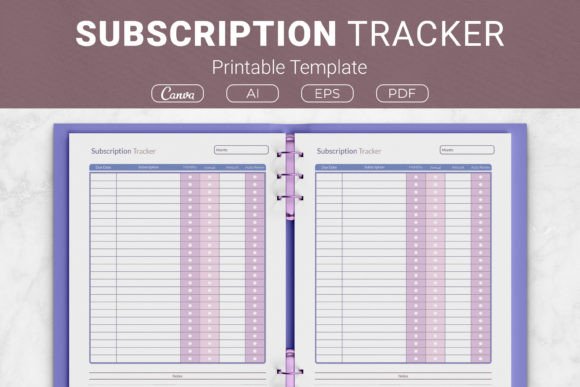
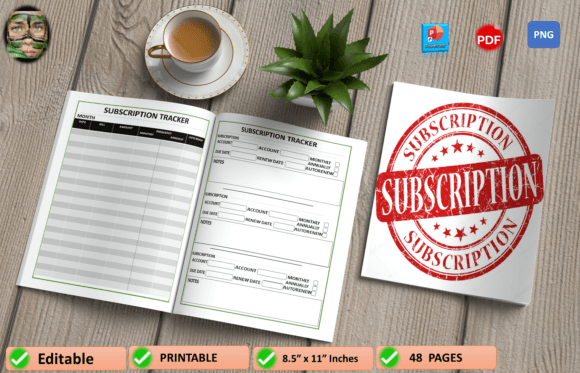
Download the PDF, print the two pages (the planner includes two variations to fit different needs), and place them where you’ll actually use them. For many people, that means a clear plastic sleeve in the front of a finance binder or pinned to a home command center. Because it’s a physical page, you’re far more likely to update it while reviewing a paper bank statement or right after signing up for a new service online.
Here’s a simple workflow you can adopt immediately:
- Capture every membership in one sitting. Go through your credit card and PayPal transactions from the past three months. Write down the service name, cost, billing cycle, and renewal date. This first audit often reveals surprises you’ve been paying for quarterly or annually without noticing.
- Mark the priority level. Use a simple system: essential (utilities, professional tools, insurance), nice-to-have (streaming, premium newsletters, hobby kits), and review-later (trial offers you haven’t evaluated yet). The printable likely includes columns or space for notes—use that for quick status updates.
- Schedule a monthly check-in. Pair this with another regular task, like paying rent or reconciling your checking account. Pull out the tracker, glance at any upcoming renewals, and cancel anything that no longer serves you before the next charge hits.
When a new subscription pops up—maybe a design asset platform you’re testing for a client project—add it to the tracker immediately. The act of writing it down makes the commitment feel real, and you’ll remember to evaluate it later instead of letting it drift into autopay oblivion.
Before, During, and After a Project: Using the Tracker as a Decision Filter
Subscription creep often happens around projects. You might sign up for a video editing tool during a launch week, a stock photo site for a branding refresh, or a course platform for a learning sprint. The Subscription Membership Planne Printable becomes a place to log those temporary subscriptions with a clear end date or review date attached.
Before a project, review your tracker to see if you already have a tool that does what you need. That premium to-do list app you’re paying for monthly might include a collaboration feature you never explored. Catching this overlap before swiping your card saves both money and the mental load of managing yet another account.
During a project, you can note actual usage. If you’re underusing a service that seemed critical during planning, flag it. After the project wraps, the tracker turns into a clean-up list. Go through each subscription added for that specific workload and decide whether to retain, downgrade, or cancel. This prevents the all-too-common scenario where a freelancer ends up with five separate cloud storage subscriptions because each client used a different platform.
Integration with Other Tools and Resources
A paper tracker doesn’t live in isolation. It works powerfully alongside a few complementary systems:
- Budgeting apps or spreadsheets: Transfer the monthly totals from your tracker into your digital budget. The paper version gives you a quick reference; the digital version does the math and projects future cash flow.
- Calendar alerts: Use the renewal dates you’ve written down to set a reminder two days before each annual subscription renews. This gives you a window to cancel or renegotiate.
- Password manager notes: Many password managers let you store payment details or renewal notes. Ask yourself: if your subscription tracker is the source of truth, add a short note like “see tracker” to encourage yourself to review the physical page regularly.
- Physical bill-paying station: If you already keep a folder for incoming bills, slot the subscription tracker right at the front. It acts as an index of recurring commitments against which you can verify each statement.
Integration also means sharing it with a partner or team member. In a household, both adults can update the same tracker, so there’s no confusion over who cancelled what. In a small business, the tracker can sit in a shared binder where the office manager logs software subscriptions against a company card, making monthly reconciliation much faster.
Variations in Design: Why Two Pages Matter
The printable you’ll use includes two distinct variations. One might offer a minimal layout with space for service name, amount, billing frequency, and a cancel/keep checkbox. The other could be more detailed, with columns for login details, shared users, and specific renewal dates. Having both means you can tailor the system to your context without forced complexity. Use the simple version for personal streaming services and the detailed one for business-critical tools, or keep one as a master list and the other as a quarterly review sheet.
This design flexibility is important because subscription tracking isn’t a one-size-fits-all task. A graphic designer might need to log font library subscriptions with expiration dates tied to client projects. A podcaster might track audio hosting fees, transcription services, and scheduling tool subscriptions all on one page. The two-page approach lets you group, separate, or duplicate however you see fit.
Long-Term Consistency and Habit Building
The biggest challenge with any tracking system is maintaining it past the initial excitement. Here’s how to make a Subscription Membership Tracker Printabl stick:
- Keep it visible. Tucking it into a binder you never open defeats the purpose. Place it on a clipboard near your desk or inside a planner you reference daily.
- Combine it with a small reward. When you cancel an unused subscription, transfer that exact monthly amount into a savings line or a discretionary fund. The immediate financial reward reinforces the habit.
- Update during natural pauses. After paying a credit card bill, take two minutes to check the tracker against the statement. The pairing creates a natural cue without requiring extra discipline.
- Use erasable pens or pencil. Subscriptions change, and you don’t want a messy page discouraging updates. Frixion pens or soft pencils make changes neat and easy.
Over a year, you’ll likely see patterns emerge. You might discover that you sign up for more streaming services in winter or that you need creative assets only during certain campaign seasons. That data helps you plan ahead, budget more accurately, and even negotiate better timing with clients if you’re a freelancer.
For Different Audiences: How the Tracker Adapts
Professionals and entrepreneurs can use the tracker as a lightweight operational expense monitor. Instead of sifting through accounting software for every small recurring charge, they get an at-a-glance view of monthly SaaS burn. That clarity often leads to renegotiating plans or switching to annual payments once a tool proves its long-term value.
Content creators and bloggers balance a flood of creative tools, stock media subscriptions, social schedulers, and course memberships. A dedicated tracker page helps them separate “learning mode” subscriptions from those actively used in content production. When revenue dips, they know exactly which line items to pause first.
Educators and students juggle platform access, research database fees, and note-taking app subscriptions that often go unchecked between semesters. After a semester ends, a quick review of the tracker prevents paying for a resource they won’t use for months.
Families can list shared subscription services—music plans, video streaming, meal kit deliveries—and note who primarily uses each. This helps avoid duplicate accounts and makes it easier to switch plans when kids outgrow certain entertainment options.
Quality Control: Keeping Your Data Accurate and Actionable
A subscription tracker is only as useful as its accuracy. Every quarter, do a deep reconciliation: compare the tracker against your actual bank or credit card activity. Look for zombie subscriptions—services you continue to pay for but haven’t used in months. Also, note any price increases. A streaming service that crept from $9.99 to $14.99 over two years might not be worth it anymore, but if you only glance at the total, you miss that incremental change.
Also, audit the categories you’ve assigned. Something that was essential six months ago might have become a nice-to-have. Moving it down a tier can immediately free up funds without losing the service entirely. The two pages allow you to shift items from one sheet to another as priorities change.
From Awareness to Action: Deciding What Stays and What Goes
The true value of the Subscription Membership Tracker Printabl lies in the decisions it surfaces. When you see a list of eight subscriptions totaling over $200 a month, the emotional response is different than seeing them scattered across statements. You’re far more likely to ask critical questions: “Do I actually watch this streaming service, or is it just background noise?” “Is this professional membership bringing in enough clients to justify its cost?” “Can I delay this renewal until I finish the current project?”
Write those questions directly on the tracker. Use the notes space to record decisions: “Cancel after June,” “Switch to annual in November,” or “Share account with colleague starting next month.” The page becomes a living contract with yourself, and checking off those action items brings a satisfying sense of closure.
Why a Printable Beats a Purely Digital Solution
You might wonder why you wouldn’t just use a spreadsheet. A spreadsheet is excellent for calculations, but it lacks the physical presence that prompts regular review. Notifications get swiped away; files get buried in folders. A Subscription Membership Planne Printable sits in your environment, demanding attention every time you pass by. The act of handwriting also strengthens memory and commitment—studies have shown that writing by hand boosts retention and processing, which means you’re more likely to follow through on cancellations you’ve marked in ink.
Plus, when you share a home or office, a physical tracker becomes a shared reference point. You don’t need to send screenshots or grant access to a cloud document; anyone can glance at the page and know the current state of things. It’s low-tech, high-touch, and remarkably effective.
Making It Your Own: Customization and Regular Refresh Cycles
Don’t be afraid to adapt the tracker to your needs. Use highlighters to color-code status: green for active and essential, yellow for under review, pink for cancel as soon as possible. Add a column for the login email if you share accounts with family members. Some people attach a small envelope to the back of the page to hold cancellation confirmation emails or screenshots—a quick-reference archive that closes the loop.
Every six months, consider printing a fresh set of pages. Transfer only the subscriptions that remain relevant, and leave the old sheet as a historical record. This refresh prevents clutter and gives you a chance to reassess categories. It’s a perfect complement to a seasonal decluttering mindset, applying the same “does this spark joy?” logic to your financial commitments.
Ultimately, the Subscription Membership Tracker Printabl is not just about saving money—it’s about reclaiming control over your digital consumption and financial attention. When you plug it into your existing planning system, you’ll quickly notice fewer surprise charges, more intentional spending, and a quieter, more manageable financial life.