Why 10 KDP Interior Floral Coloring Pages Are About More Than Just Pretty Flowers
There is a quiet magic in opening a freshly printed coloring book. The scent of paper, the weight of the cover, the promise of calm focus. When you decide to create that experience for others through Kindle Direct Publishing, you quickly realize the interior pages are the heartbeat of your product. The 10 KDP Interior Floral Coloring Pages bundle, especially with its editable Canva template, has caught the attention of many self-publishers. It promises not only artwork but a streamlined creative process. Yet, as with any ready-made asset, the difference between a successful book and a project that quietly fails often comes down to the small decisions you make before you ever hit publish.
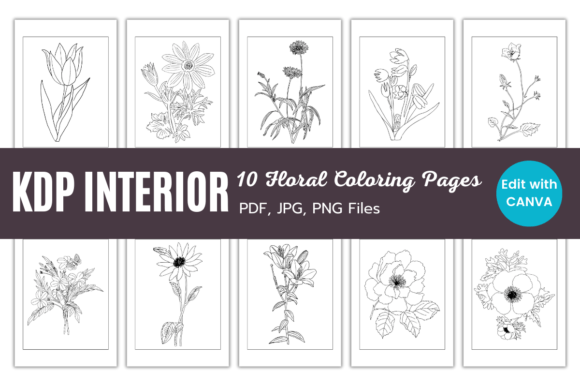
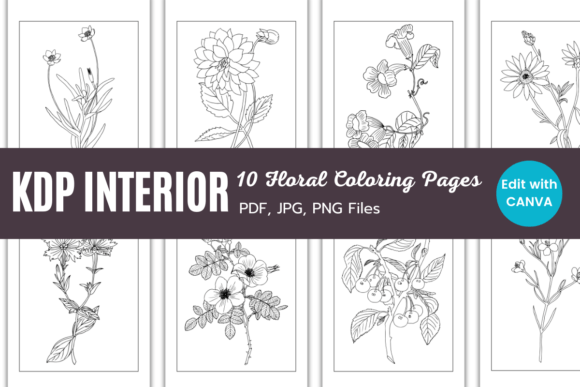
This collection offers ten vintage-style floral drawings, sized perfectly at 8.5 x 11 inches with a crisp 300 DPI. You receive PDF, JPG, and PNG files, plus a direct link to a Canva template that lets you drag, drop, and edit to match your branding. On the surface, it looks like a straightforward shortcut. The practical reality is more nuanced. Understanding what these assets truly are, and how to handle them with care, can save you from wasted time, confusing print results, and disappointing customer reviews.
What Makes This Floral Bundle Different From a Random Image Pack
A quick search for "floral coloring pages" returns thousands of results. Many are inconsistent, poorly traced, or not truly designed for print. The 10 KDP Interior Floral Coloring Pages set takes a more curated approach. The vintage style is deliberate, not a happy accident. The line art carries a gentle, nostalgic quality that appeals strongly to adults who seek relaxation rather than cartoonish simplicity. Because the theme is cohesive, your book feels intentional rather than like a messy collage of unrelated images. That coherence is often what convinces a browser to become a buyer.
People are drawn to this bundle for several reasons. Beginners love the idea of skipping the illustration phase entirely. Experienced creators appreciate the Canva integration, which lets them tweak page layouts, add title text, or adjust margins without switching between complicated software. Marketers see a niche that blends the timeless appeal of flowers with the growing demand for mindfulness activities. The interest is real, but so are the pitfalls when you move too fast.
Common Mistakes That Turn a Beautiful Interior Into a Frustrating Experience
We often focus on the art itself and ignore the technical scaffolding that holds a print book together. The most frequent errors are not about taste; they are about overlooked details that quietly damage quality and profitability. Let's walk through a few, not as a checklist to fear, but as friendly corrections from someone who has seen these slip-ups more times than I can count.
Assuming Every Page Is Ready to Print Without Adjustments
When you download the JPG or PNG files, it is tempting to drop them straight into your KDP manuscript and feel done. However, even at 300 DPI and 8.5 x 11 inches, the files may not include bleed. KDP requires a 0.125-inch bleed on all sides if your images run to the edge. Without it, you risk white slivers along the borders, which look amateurish. A common misunderstanding: the seller provides high-resolution files, so they must be print-ready. Not always. The files are beautiful raw material, but they need to be placed inside a properly sized document with the correct trim, bleed, and safe zone margins.
Better approach: Open the provided Canva template link first. That template is likely already set to the correct dimensions with bleed included. Use the drag-and-drop feature to arrange the floral pages exactly as you want them. If you prefer working directly with the PDF or images, create your document in your chosen software and manually extend the background color or a decorative border to the bleed edge. Never assume; always measure.
Overediting the Vintage Character Out of the Art
It is tempting to make things "cleaner" or "brighter" using Canva's filters or by adjusting contrast. I have seen creators increase the sharpness to such a degree that the delicate stippling and fine lines become harsh and jagged. The vintage feel gets lost. The original 300 DPI files are designed to preserve that soft, hand-drawn warmth. Heavy-handed editing can turn a nostalgic rose into a pixelated mess that looks like a low-quality scan.
A practical fix: Trust the source files. If you need to make brand-specific changes, limit yourself to adding your logo, a subtle title page, or a soft background tint behind the line art. Avoid altering the line work itself unless you absolutely must. When you do edit, zoom in to 100% and check for artifacts. The goal is to present a coloring experience that feels authentic, not digitally scrubbed.
Forgetting the End User's Coloring Tools
A floral illustration looks lovely on screen with a white background, but coloring enthusiasts use pencils, gel pens, and sometimes even markers. Thick, dark lines can forgive minor coloring strokes, but overly thin, intricate lines might blur or become frustrating. The vintage style in this bundle typically strikes a good balance. Yet some creators make the mistake of significantly reducing the line art size to fit more designs on one page, shrinking details until they are painful to color. That leads to negative reviews mentioning "impossible to enjoy" experiences.
How to avoid this: Respect the original 8.5 x 11-inch layout. If you want variety, consider offering a mix of full-page designs and smaller grouped illustrations, but always test print a sample. Print two or three pages at home and color them yourself with different tools. It is the single most revealing exercise you can do, and it costs almost nothing.
The Canva Template: A Powerful Tool If You Handle It Wisely
The editable Canva template link included with the 10 KDP Interior Floral Coloring Pages is a genuine time-saver. It allows you to drag, drop, and edit without Adobe Illustrator or InDesign. But convenience sometimes leads to overlooked export settings. Canva's default PDF export may not be set to the highest print quality, or it may compress images slightly. When you download your final interior file, always choose PDF Print and check "flatten PDF" and "crop marks and bleed" if your template includes them. Skipping this step can embed fonts incorrectly or reduce the sharpness of the outlines. Another oversight: forgetting to remove Canva's "page number" placeholders or any leftover guide text. I have seen proof copies arrive with "Click to add text" still visible in a corner, which is both embarrassing and preventable.
Use the Canva template not just as a layout jar but as a learning scaffold. Study how it is built. Where are the margins? How is the bleed handled? What font sizes work well for the title? This knowledge translates to your future projects, making you a more confident publisher.
Real-World Example: Two Creators, Two Results
Consider Maya and Laura. Both bought the same floral coloring page bundle with the Canva template. Maya rushed. She dragged the images into a new Canva doc, slightly resized one to "fit better," exported at the default setting, and published within two days. Her first review mentioned "pixelated lines" and "images cut off at the edge." Maya had scaled up an image without locking proportions, and the export compression degraded the art.
Laura took an extra afternoon. She opened the supplied template, kept the original image dimensions, added a gentle "This Book Belongs To" page using Canva's text tools, and exported using PDF Print with bleed enabled. She ordered a proof copy, colored a few blooms herself, and noticed one page had a tiny smudge from an editing oversight. She corrected it. Her launch led to reviews praising the "crisp, beautiful florals" and the "thoughtful layout." The same source files, two entirely different outcomes.
What to Check Before You Make a Decision or Publish
Whether you are evaluating the 10 KDP Interior Floral Coloring Pages for purchase or you have already downloaded them, a few deliberate checks can prevent costly missteps.
- Verify the license and terms. Confirm that the bundle allows commercial use in KDP print books. Most sellers grant it, but some restrict the number of copies or require attribution. Read the small print to avoid account issues later.
- Inspect each image at full resolution. Open the PNG or JPG at 100% zoom. Look for unintended jagged edges, compression artifacts, or inconsistent line weights. Even premium bundles can have a stray file that slipped through quality control.
- Test the Canva template link immediately. Links can break. Ensure it opens to a template you can copy and save to your own Canva account. If it doesn't, reach out to the seller right away.
- Print a physical proof before ordering author copies. Home printers are not perfect, but they reveal 90% of layout issues. Check margins, bleed, and how the ink interacts with your chosen paper weight in the final draft.
- Consider the coloring experience flow. Arrange the pages so that simpler designs alternate with more complex ones. This keeps the colorist engaged without overwhelming them. The sequence matters more than most realize.
Where People Go Wrong With Branding and the Canva Template
The ability to "match your branding" is a huge selling point. You can add your logo, a custom color palette, or gentle floral motifs to the interior frames. A common misstep is over-branding. Adding a large, colorful logo to every single page distracts from the primary purpose—coloring. Another subtle error is using a background color that is too dark or too saturated. When printed, it can bleed through to the other side, especially if you use standard white paper. If you must have a tinted background, keep it extremely faint, and always test with a double-sided print.
When you add text, such as "Relax and Unwind" or your website URL, place it thoughtfully. The Canva template makes it easy to drop text boxes anywhere, but if that text falls too close to the trim line, it may be cut off or look unbalanced. Position all text well within the safe zone, typically at least 0.5 inches from the edge for an 8.5 x 11-inch book.
The Subtle Art of Using JPG, PNG, and PDF Files Effectively
The bundle provides multiple file formats for a reason. JPG files are smaller and easy to preview, but they have slight compression that can affect ultra-fine lines. PNG files preserve transparency and lossless quality—ideal if you plan to layer them over a subtle texture or tint. The PDF typically contains the most print-ready representation, often with vectors or high-fidelity raster data. Many novices grab the first JPG they see and run with it. A smarter workflow: use the PNG or PDF for your final layout. Use the JPG only for quick mockups or digital previews. This small choice can noticeably sharpen your final product.
Also, watch out for the mistaken belief that higher DPI always means better. 300 DPI is the gold standard for print. If you try to resample a 300 DPI image to 600 DPI in Canva or another editor, you don't magically create new detail; you just bloat the file size and risk interpolation artifacts. Trust the native resolution. The files are optimized for 8.5 x 11 inches at 300 DPI, and that is precisely what KDP presses expect.
Building a Long-Term Creative Habit, Not Just a One-Off Product
Once you have successfully published your floral coloring book, the temptation is to move on to an entirely different theme and start from scratch. A more sustainable approach is to view this bundle as a template for a series. With the Canva template, you can easily replicate the layout structure, change the cover, and release seasonal versions—spring blooms, autumn wreaths, holiday bouquets—using the same core aesthetic. This builds a recognizable brand on your KDP shelf and encourages repeat customers.
The 10 KDP Interior Floral Coloring Pages are not just a product; they are a foundation. When you handle them with care, respect the craft of print, and avoid the rush-to-publish mentality, your coloring book becomes something more than a digital file transformed into paper. It becomes a small, beautiful invitation for someone to pause, pick up a pencil, and breathe. And that is worth every minute of thoughtful preparation.