Kids Dream Journal KDP Interior for Easy Publishing
Getting a children’s journal ready for Amazon KDP can feel overwhelming when you face margin settings, bleed requirements, and file resolution checks. The Kids Dream Journal KDP Interior bundle removes that guesswork. It is a set of print-ready and editable interior files designed specifically for a dream-themed notebook that kids can fill with their nightly adventures. Instead of building pages from scratch or troubleshooting formatting errors, you download a tested package and move straight to uploading or customizing.
Different people see different value in a product like this. A side-hustler publishing their first journal needs confidence that the file will pass KDP’s automated checks. A seasoned designer might want the editable EPS file to add unique illustrations or swap typography. A parent creating a personalized gift for a child cares more about layout clarity and a gentle, dreamy aesthetic. By looking at the features through these lenses, you can decide whether this interior template matches your current project and skill level.
What Makes a Dream Journal Interior Work for KDP
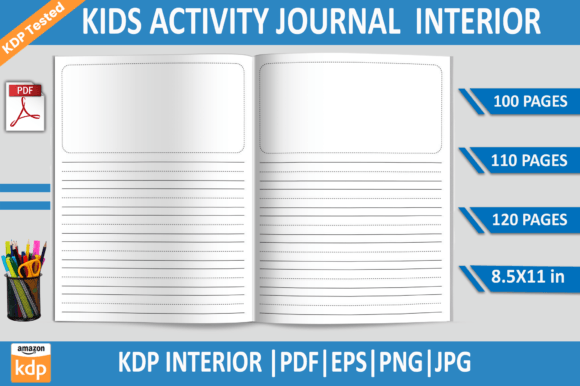
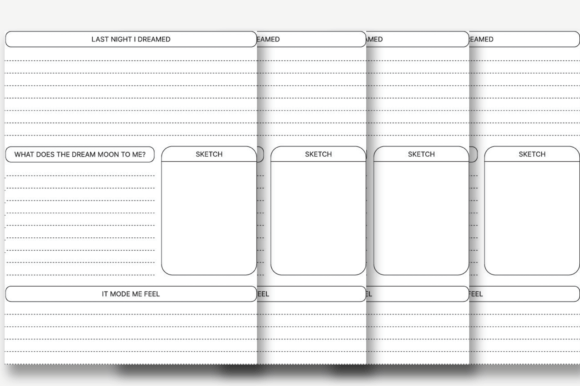
An interior file for Kindle Direct Publishing is not the same as a regular printable PDF. Amazon’s print-on-demand system expects specific dimensions, safe zones, and a file format that renders consistently across different printing facilities. The Kids Dream Journal KDP Interior arrives as a 8.5×11-inch file with no bleed, which simplifies layout because you do not need to extend artwork past the trim edge. Everything stays within a predictable printable area, reducing the chance of content being cut off.
The bundle includes multiple page counts: 100, 110, and 120 pages. That variety matters because spine width on a paperback changes with page count. Having three ready-made options means you can experiment with thickness and perceived value without recalculating margins or regenerating the entire interior. The files were tested on KDP to confirm they upload smoothly and produce clean printed proofs, which is a practical detail that saves time for anyone who has wrestled with rejection emails from Amazon’s content review.
Who Benefits from a Pre-Designed Journal Interior
A single product can serve surprisingly different needs. The same Kids Dream Journal KDP Interior Template might help a busy entrepreneur launch a low-content book in a weekend, while an illustrator treats it as a structured canvas to layer original art. Recognizing where you fit helps you use the files more effectively and avoid paying for capabilities you might not need.
For First-Time Self-Publishers: Eliminating Technical Hurdles
If you are new to KDP, your main priority is reliability. You want an interior that uploads on the first try without cryptic error messages about margins, DPI, or ink density. This bundle’s PDF files are formatted at 300 DPI, the standard for print clarity, and exported as flat print-ready documents. You simply open your KDP dashboard, upload the PDF, and preview. No adjusting layers or worrying about transparent objects that might cause issues during the printing process.
Beginners often underestimate the importance of page count flexibility. A 100-page journal feels thinner and may be priced lower, while a 120-page version gives a more substantial feel. Because you receive both, you can A/B test in the marketplace or adapt to a particular niche without buying separate templates. One purchase covers the foundational structure for several product variations.
For Experienced KDP Sellers: Speed and Niche Expansion
Publishers who already manage a catalog of low-content books value speed and differentiation. They can take the provided EPS file – a fully editable vector format compatible with Adobe Illustrator – and modify header text, add themed icons, or inject entirely new dream-related prompts. The transparent background PNG and high-resolution JPG files offer quick drag-and-drop options for those who work in Canva or other design tools but want to preserve a crisp, professional look.
Expanding into a kids’ dream journal niche becomes less of a gamble when the technical foundation is already KDP-tested. Seasoned sellers often combine such interiors with pre-made covers, focusing their creative energy on marketing and keyword research. The template acts as a reliable backbone that keeps the product launch timeline short.
For Designers and Illustrators: An Editable Framework
Professionals who offer custom interiors to clients or sell templates themselves will examine the source files closely. This bundle includes an EPS file, which means every element – line strokes, text objects, guide layouts – is editable without loss of quality. You can restyle the journal pages to match a client’s brand palette, replace standard lines with playful borders, or embed subtle watermarks that enhance the dream theme.
The availability of multiple page count files in editable format also means you can deliver bulk variations to a client who wants options for different age groups. The clean, uncluttered design leaves room for your creative input, so you are not starting from a blank artboard but still retain full artistic control.
For Parents, Educators, and Gift Creators
Not every user intends to sell on Amazon. Some want a beautifully structured journal for a child’s bedtime routine, a classroom creative writing exercise, or a handmade gift. The Kids Dream Journal KDP Interior can be printed at home or through a local print shop, and the 8.5×11-inch size works well with standard binders or comb binding.
An educator might print selected pages from the 100-page file to create weekly dream reflection sheets. A parent could take the JPG files and insert them into a digital planner app on a tablet for a child who prefers drawing with a stylus. The transparent background PNGs even allow you to layer the lines over custom illustrations, turning a standard journal worksheet into a more immersive experience.
Understanding the File Package: What’s Inside and Why It Matters
When you purchase this product, you receive a collection of file types, not a single rigid PDF. This approach respects that different tools and goals call for different formats. Here is how the pieces fit together for common tasks.
- Print-Ready PDFs (100, 110, 120 pages): These are the direct-upload files for KDP. No edits needed for a basic journal. They hold the exact interior layout that passed testing.
- EPS File: Best suited for Adobe Illustrator users who want to modify the design. Vector paths stay sharp at any scale, and you can export new PDFs once your changes are complete.
- PNG Files: Individual page images with transparent backgrounds. Useful if you are building a digital product, creating mockups, or assembling a hybrid journal where you layer the lines over custom artwork.
- JPG Files: High-resolution flat images at 300 DPI. Convenient for quick previews, adding to presentation slides, or printing test pages without opening design software.
All files share the same core dimensions and resolution, so mixing and matching across projects does not introduce inconsistency. The lack of bleed simplifies everything from previewing to trimming if you decide to print at home.
Navigating Priorities: Cost, Quality, and Creative Control
People evaluate a template based on different values. If your main concern is cost-efficiency, you might focus on the fact that one bundle provides three page counts, effectively giving you multiple products from a single purchase. If you prioritize quality assurance, the KDP-tested claim and 300 DPI resolution become the deciding factors. Those seeking creative flexibility will gravitate toward the EPS and PNG files, while those who need speed will lean on the ready PDFs.
For a small business owner planning a Q4 product push, the reliability of a tested interior reduces the time spent troubleshooting. A hobbyist who enjoys tinkering might spend an afternoon inside Adobe Illustrator, tweaking line spacing and adding whimsical corner graphics. The template does not lock you into one workflow; it adapts based on how much effort you want to invest.
Practical Ways to Use the Kids Dream Journal KDP Interior
Beyond the straightforward act of publishing a journal on Amazon, the files open up other possibilities. A content creator might use the lined pages as the foundation for a digital dream journal app prototype. A blogger writing about children’s sleep habits could offer a free printable excerpt as a lead magnet. A local youth program might print spiral-bound copies for participants, pairing the journal with audio-guided dream meditations.
If you are evaluating whether this interior matches your project, ask yourself a few questions. Are you comfortable with no-bleed design, or do you need artwork to extend to the page edge for a specific aesthetic? Do you have the tools to open and edit an EPS file, or would you prefer to work exclusively with pre-made PDFs? How important is it that the page count is adjustable without repurchasing? The answers will clarify whether this particular template fits your workflow or if you need a more heavily illustrated, full-bleed alternative.
Long-Term Usefulness of a Flexible Interior Template
A common frustration with KDP interiors is outgrowing them. You buy a file for one project, and later you find yourself needing slightly different spacing, a new page count, or a format that works in a landscape orientation. Because this bundle includes an editable source file, its usefulness extends beyond a single product. You can revisit the design months later, repurpose the structure for a different age group, or adapt the grid to a gratitude journal or a doodle diary.
For educators and therapists, that means the same core layout can evolve with a child’s developmental stage. Younger kids might start with larger writing areas and simpler prompts; older kids can handle narrower lines and more sophisticated dream recording. The template becomes a lasting design asset rather than a one-time disposable download.
The instant download aspect also means you can recover the files easily if you lose local copies, as long as you keep your purchase records. No waiting for physical delivery or dealing with broken digital links. Combined with the transparent background PNGs, you have the building blocks to integrate the journal format into hybrid print-digital projects without pixelation or awkward white boxes around the lines.
When you evaluate any KDP interior template, think beyond the immediate product listing. Consider how it might support future experiments, client work, or personal creative goals. A well-organized file package with editable options and multiple page counts gives you room to grow, and that is where the practical value often hides in plain sight.